Assign Administrator or Insights User Rights
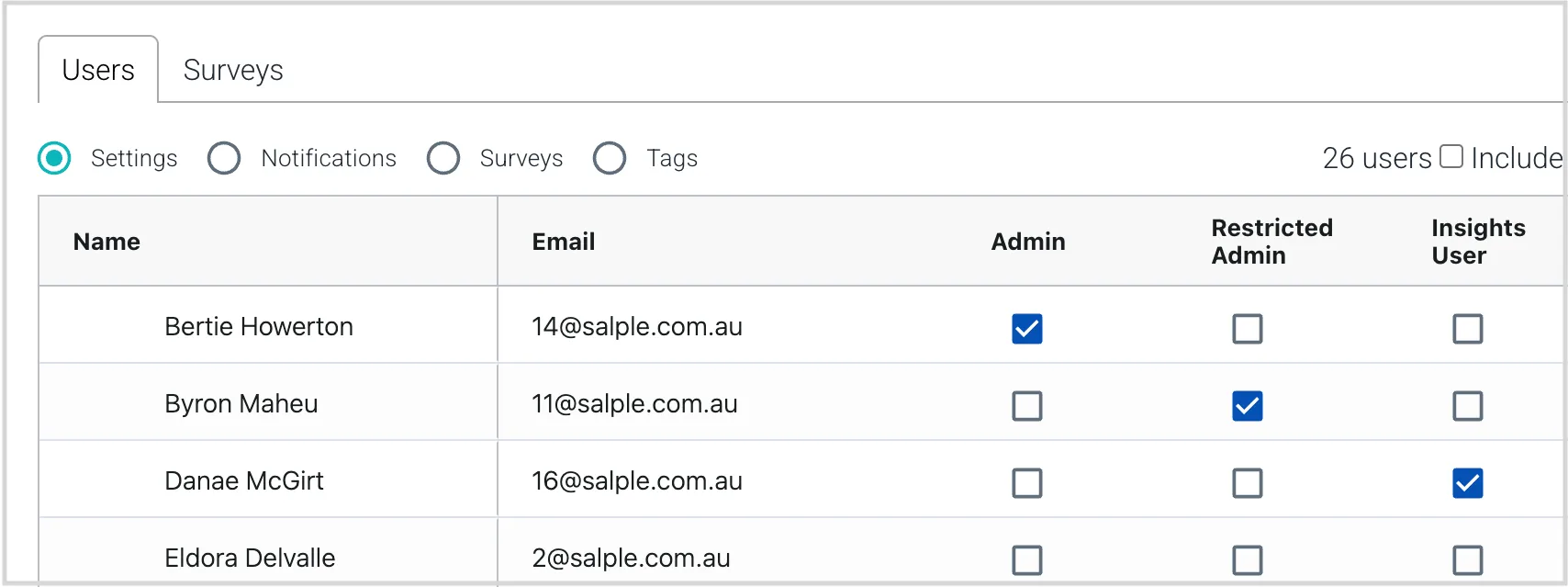
note this function is only available to your organisation's salpulse administrator(s) (and not restricted administrators) to assign administrator rights to a user, from the users tab of the admin https //app salpulse com/admin menu item, select the settings radio button, then tick the admin box for that user revoke administrator rights by unticking the box to assign restricted administrator rights to a user (or to switch a user from an admin to a restrcted admin), tick the restricted admin box for that user to make a user an insights user, tick the insights user box for that user when you make an admin user an insights user, you are downgrading them (their administrator rights will be revoked) restricted admins will keep their restricted admin priveleges when they are made an insights user note the restricted admin rights are designed to give an administrative person access to most of the function allowing them setup and manage the organisation and users on the system, without disclosing sensitive data that only full administrators can see note the insights user rights are designed to give a user (eg from the senior leadership team) more comprehensive access to the survey data, without allowing them full administrator access privileges map function admin restricted admin i nsights user user \<font color="#ff6900">administrator functions\</font> assign administrator rights docid\ bskrjyhudgmrkxfo1u4pi \<font color="#3b9f0f"> \</font> \<font color="#3b9f0f">\</font> \<font color="#eb144c">x\</font> \<font color="#eb144c">x\</font> \<font color="#eb144c">x\</font> edit, move or delete a salp or comment docid\ r87rm9k9cxlnfdlik8ksj \<font color="#3b9f0f">\</font> \<font color="#eb144c">x\</font> \<font color="#eb144c">x\</font> \<font color="#eb144c">x\</font> add, delete or manage users docid\ vtjy dj1jqjokp teytr \<font color="#3b9f0f">\</font> \<font color="#3b9f0f">\</font> \<font color="#eb144c">x\</font> \<font color="#eb144c">x\</font> change users' settings docid\ bbfisb1n9l2dotp5bcde6 \<font color="#3b9f0f">\</font> \<font color="#3b9f0f">\</font> \<font color="#eb144c">x\</font> \<font color="#eb144c">x\</font> reset users' passwords docid\ pprv8y icknztxxaemgwl \<font color="#3b9f0f">\</font> \<font color="#3b9f0f">\</font> \<font color="#eb144c">x\</font> \<font color="#eb144c">x\</font> manage and send salpulse surveys docid\ veft4kutj29qoj5s53cai \<font color="#3b9f0f">\</font> \<font color="#3b9f0f">\</font> \<font color="#eb144c">x\</font> \<font color="#eb144c">x\</font> setup and assign breakdown tags docid\ r0 19 plx6xstudxb7tlv \<font color="#3b9f0f">\</font> \<font color="#3b9f0f">\</font> \<font color="#eb144c">x\</font> \<font color="#eb144c">x\</font> \<font color="#ff6900">survey results visibility\</font> standard aggregate results \<font color="#3b9f0f">\</font> \<font color="#3b9f0f">after survey closes\</font> \<font color="#3b9f0f">\</font> \<font color="#3b9f0f">after survey closes\</font> psychosocial safety docid\ cep0ovpwamp40ddon5498 results \<font color="#3b9f0f">\</font> \<font color="#eb144c">x\</font> \<font color="#3b9f0f">\</font> \<font color="#eb144c">x\</font> comments docid\ jj3f6rbp 85pfyfvi1dap people add during the survey \<font color="#3b9f0f">\</font> \<font color="#eb144c">x\</font> \<font color="#eb144c">x\</font> \<font color="#eb144c">x\</font> individual results docid\ d6kle5uvjiz84jgar8wxk (where employees have chosen to be non anonymous) \<font color="#3b9f0f">\</font> \<font color="#eb144c">x\</font> \<font color="#eb144c">x\</font> \<font color="#eb144c">x\</font> view department and region breakdowns docid\ tru0r98cjsiwjnu0l4rgs \<font color="#3b9f0f">\</font> \<font color="#eb144c">x\</font> \<font color="#3b9f0f">\</font> \<font color="#eb144c">x\</font> setup department and region breakdown views docid\ r0 19 plx6xstudxb7tlv \<font color="#3b9f0f">\</font> \<font color="#eb144c">x\</font> \<font color="#33a003">limited to 1 custom view\</font> \<font color="#eb144c">x\</font>